Radiophonia v0.8.0: Smarter Streams, Better Controls, and the Best Radio Experience Yet
Published: 19 June 2026
v0.8.0 is the biggest reliability and usability update Radiophonia has seen. If a stream drops, the app now offers an instant alternative. If you are browsing stations by genre or country, the previous and next buttons actually move within that list instead of jumping somewhere random. The Now Playing screen has been reworked from the ground up, and dozens of fixes make the app more stable across every platform.
Smarter Stream Handling
Alternate source discovery — when a station has multiple stream sources (many do), Radiophonia now finds them automatically. Each source shows its bitrate and quality label so you can pick the right one for your connection.
Smart failover — if the current stream fails to connect or drops unexpectedly, a “Try another source” button appears right in the playback status banner. One tap and the app cycles to the next available stream without leaving the Now Playing screen.
Stream validation — every alternate source is checked before it appears in the list. Unreachable or invalid streams are silently removed, so you only ever see working options.
Stream selection sticks — pick a different source for a station and the app remembers your choice, even when the station list refreshes.
Reliability fixes under the hood — a whole set of behind-the-scenes improvements stop the infamous “doom loop” (where the proxy kept killing and restarting connections) and the “broken record” effect (where audio repeated after a reconnection). Bauer and Absolute Radio streams now update track info reliably, and the proxy now handles HLS streams the same way as regular streams, making recording work on Windows HLS stations too.
Context-Aware Previous and Next
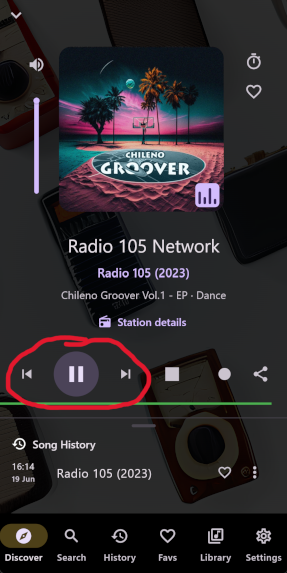
Previous and next station controls now understand where you started listening. If you opened a station from your favourites, search results, Discover, recent stations, or a country/genre drill-down, skip controls move within that same list instead of using a generic global order. Voice commands and media-session controls follow the same smart behaviour.
Now Playing: Reworked
The Now Playing screen has seen the most visual changes in this release.
Vertical volume slider — volume control is now a vertical slider on the left of the album artwork. This saves horizontal space and feels more natural. The duplicate horizontal slider and mute button that were causing overflow issues are gone.
Double-tap to zoom album art — double-tap any album artwork (or station avatar) to see it full-screen, fitted within your screen without cropping. Tap again to return to normal view.
Compact landscape navigation — when you rotate your phone to landscape, the bottom navigation bar shrinks to 56px tall, giving you more room for the Now Playing screen. Only the selected tab shows its label, keeping things clean.
Fixed layout issues — the artwork no longer breaks the layout when album art arrives mid-playback, and the side controls stay properly aligned with the artwork edges.
Browse Country Search
Searching stations by country now matches both country names and their ISO codes. Typing gb finds the United Kingdom. Typing de finds Germany. Punctuation and case differences are handled automatically.
Curated Station Deep Links
Station links from the website now work even better. Opening a link like radiophonia.app/station/talkradio or radiophonia://station/talkradio resolves bundled curated stations directly and starts playback — no need for the station to exist in RadioBrowser.
Platform Polish
Every platform got attention in this release.
Android — a new store-safe build process separates full-feature builds from store submission builds, preventing accidental submission with the wrong permissions. iOS ATS is fixed so plain HTTP radio streams play without compromising security for other traffic. The Android activity now handles Android 15 edge-to-edge rendering properly.
macOS — recording folders now keep their permissions after you select them, fixing the “can’t write to this folder” error that some users experienced.
All platforms — the curated stream checker now retries temporary CDN errors before marking a stream as dead, preventing a single 502 error from taking a station offline.
Search Restored and Improved
Tapping a station in search results now starts playback immediately again. Long-press or secondary-click still opens the station preview sheet with recent songs and quick actions.
Performance: Infinite Scroll
Browsing large categories like Countries, Languages, Genres, and Discover now loads results as you scroll, so big directory sections are no longer capped to a single page.
Full Fix List
This release includes dozens of smaller fixes that add up to a noticeably smoother experience: stale song metadata now clears properly on intermittent stations, MusicBrainz artwork lookup finds cover art more reliably, the premium purchase progress state actually updates during checkout, Bluetooth disconnect notices are shown only the first few times, the Windows CMake developer warning is silenced, and many more.
Download Radiophonia v0.8.0 free for Android, Windows, macOS, and Linux.